


TransUnion®
3.23.06K Reviews
App Specs
- Version
- 5.8.0
- Updated On
- License
- Free
- Downloads
- 1,000,000+
- Developer
- TransUnion Interactive, Inc.
- Categories
- Finance
- Platform
- Android, iOS
Screenshots

 Analysis by AppCompare
I find credit-monitoring apps most useful when they turn an occasional, stressful task into a repeatable habit. TransUnion® takes that approach by putting credit scores, credit reports, and related offers in one finance app rather than making me manage each part separately. It is free, aimed at everyone, and developed by TransUnion Interactive, Inc., so its purpose is clear: give everyday users a more direct way to keep an eye on their credit picture.
My first impression is that this is not an app I would open for entertainment or daily banking. Its value appears when I need to check where my credit stands, review report information, or understand what offers are being shown to me. That makes it especially useful before a major financial decision, but it also means the app rewards a calm, consistent workflow more than constant checking.
How I use TransUnion® as a repeatable credit routine
I use a repeatable routine so each visit has a purpose rather than becoming another round of score-checking. This section focuses on choosing a useful review moment, keeping notes that protect sensitive details, and deciding what deserves follow-up; it also sets up the practical checks I make when getting started.
Starting with a baseline instead of chasing a number
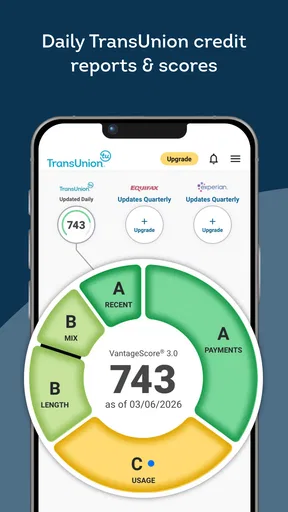
I recommend beginning with the score view, but not treating the score as the entire story. A score is a quick signal; the report gives the context. If I saw an unexpected change, I would move from the score screen into the report and look for the account, balance, payment detail, or inquiry that might explain it. That simple order prevents the common mistake of reacting to a number without understanding what sits behind it.
The app’s store summary focuses on scores, reports, and offers, and that combination is important. The report is where I would spend time checking whether account information looks familiar and whether the details match my own records. The offers area is better treated as something to review selectively, not as a reason to borrow money. A recommendation can be relevant without being suitable for my budget or current plans.
For a normal household routine, I would choose one quiet moment to review the app, save any information that needs follow-up, and then close it. I would not repeatedly refresh the score throughout the day. Credit information does not become more useful simply because I look at it more often, and frequent checking can encourage unnecessary anxiety.
A realistic example would be preparing to rent a new apartment. I might open the app to understand my current position, inspect the report for unfamiliar items, and make a short list of anything that needs clarification before submitting an application. That is a better use than opening the offers section first and assuming a displayed product is the next step I should take.
Worth Reading Before You Choose

EA SPORTS FC Mobile 26 Is a Bigger Football Game, but It Takes Time

Flipboard Shows What News Apps Must Do Beyond the Feed

Switching to Android Auto Means Rethinking Your Driving Routine

Google Calendar Makes a Crowded Week Easier to Manage

Ludo King Makes the Most of the Minutes Between Plans

Baby Panda World Brings Quick Play to Modern Phones, but Its Game Library Feels Busy
Reading the report with a checklist
When I review a credit report, I prefer a fixed sequence. I start with personal information, then move through accounts, payment history, balances, and inquiries. The exact order matters less than using the same order each time. A repeatable checklist makes it easier to notice a new item instead of becoming distracted by familiar entries.
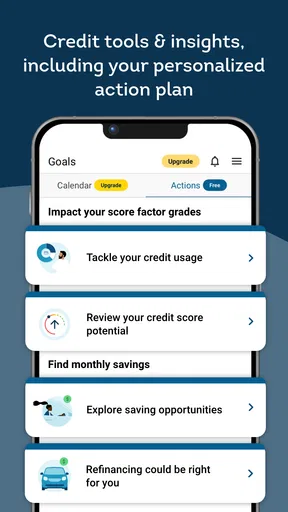
I would keep a separate note with the date of my review and the questions I need to resolve. That note does not need to contain sensitive information. A simple reminder such as “check unfamiliar inquiry” or “compare account balance with statement” is enough. This is one of the most practical ways to turn a report into an action list rather than a document I read once and forget.
If something looks wrong, I would not assume that the app itself can instantly fix it. I would first gather the relevant account statements or correspondence, identify the organization connected to the entry, and follow the appropriate dispute or contact process. The app can help me notice a problem, but noticing and resolving are separate steps.
What the audience and platform details mean in practice
The app is listed for a general audience, with an Everyone content rating, so it is positioned as an approachable finance tool rather than a specialist product. It has been available since January 8, 2014, and the current version is 5.8.0. The minimum operating-system requirement is version 10, which is worth checking before installation if I am using an older phone.
Its reach is substantial, with more than a million installs, although popularity alone does not tell me whether it fits my habits. The average rating is 3.2 from roughly eight thousand ratings, alongside about three thousand reviews. I read that as a reason to keep expectations realistic: the app is established, but users may have encountered friction that is not visible in a short store summary.
Settings and account habits worth checking
My first settings check would be notification control. A finance app can become distracting if every alert feels urgent, especially when I am already monitoring several accounts elsewhere. I would keep alerts that help me notice meaningful activity and turn down anything that encourages casual checking. The best setup is the one that supports awareness without making credit management feel like a stream of interruptions.
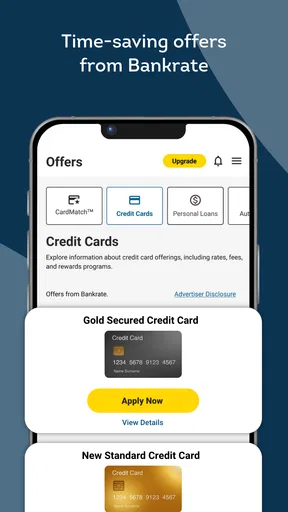
I would also review how the app presents offers and decide whether I want to use that area at all. Offers can be useful when I am actively comparing financial products, but they can also pull attention away from the report itself. I prefer to make the report review the main task and consider offers only afterward, with the same care I would use when comparing products outside the app.
Another useful habit is checking the app after an update rather than assuming every screen behaves exactly as before. Version 5.8.0 may change layout or navigation compared with an earlier installation. I would take a moment to locate the score, report, offer, and account-related areas again, especially if I rely on a saved routine. This is not glamorous, but it avoids wasting time when I need information quickly.
Because this is a finance app, I would use a strong device passcode and avoid reviewing sensitive information on a shared or public device. I would also be careful with screenshots and copied text. Even when the app makes information easy to view, the surrounding phone habits still matter. Good security is not a feature I can outsource entirely to an app.
Using shortcuts without losing judgment
The fastest pattern I found conceptually is to separate “check” from “investigate.” A quick visit can tell me whether I need to look deeper; it should not force me to read every section every time. On a routine review, I would glance at the score, note whether anything seems different, and only open the report when there is a reason to investigate or when I have deliberately scheduled a fuller review.
For a fuller session, I would use the same three-stage pattern: score first, report second, offers last. This order keeps the most important evidence ahead of the promotional material. It also gives me a clear stopping point. Once I have confirmed the report details and written down any follow-up, I do not need to continue browsing simply because another section is available.
I would also compare what I see with primary records. If the app shows a balance or account status that surprises me, I would compare it with the lender or card statement rather than immediately deciding that one source must be wrong. Differences can come from timing, reporting cycles, or the way information is displayed. The practical lesson is that the app is a monitoring window, not a substitute for every original financial record.
Another advanced but simple workflow is to use the app before and after a planned financial task. Before applying for housing or credit, I would review the report and identify anything that might require explanation. After the task, I would return later to check for new inquiries or account information. This creates a before-and-after record and is more useful than opening the app randomly with no question in mind.
Where the app helps, and where it reaches its limits
The main strength is concentration. I do not have to begin with several unrelated tools when I want a broad view of my credit position. Having scores, reports, and offers together can make the first step less intimidating, especially for someone who has never built a credit-review habit.
The limitation is that concentration can also blur the difference between information and action. Seeing an offer beside a score may make the offer feel like a recommendation tailored to my immediate needs, but I would still compare terms, consider affordability, and decide whether borrowing is appropriate. I would never let the presence of an offer turn a monitoring session into an automatic application.
I also would not use this app as my only financial-management tool. It is not a replacement for a bank app, a budgeting system, lender statements, or direct communication with an organization handling an account. Someone trying to track spending categories, pay bills, build a detailed debt plan, or manage investments would need other tools. TransUnion® fits the credit-monitoring part of the picture, not the whole picture.
Users who want a single place to check credit information may appreciate that focused scope. Users who expect every financial task to happen in one app may find it limited. That distinction is important: the app is more useful when I treat it as a dedicated checkpoint rather than a complete personal-finance command center.
Who should use it and who should skip it
I would recommend trying it if I wanted a straightforward way to establish a credit-report routine, especially before a significant application or after noticing something unusual in my finances. It can also suit someone who is learning how scores and reports fit together and wants those concepts presented within one focused finance product.
I would be more cautious about recommending it to someone who becomes stressed by every score movement. In that case, a less frequent review schedule and a written checklist may be more helpful than constant access. The app can surface information, but it cannot decide which changes matter to a person’s goals or explain every possible cause without additional investigation.
I would also suggest a different approach for someone whose priority is detailed budgeting. A budgeting app or spreadsheet designed around income, spending, categories, and cash flow would be the better primary tool. Likewise, if I needed a formal resolution for an account problem, I would use the relevant creditor or reporting process rather than expecting a monitoring screen to provide the entire solution.
My verdict after building a practical workflow
TransUnion® works best when I use it with intention: check the score, inspect the report when needed, treat offers as optional information, and keep a written follow-up list for anything that deserves attention. That workflow makes the app more valuable than simply opening it and staring at a changing number.
I like its focused role in the finance category and the convenience of having reports and offers near the score view. I also appreciate that it is free, which lowers the barrier to establishing a monitoring habit. At the same time, the modest average rating tells me not to expect a flawless experience for every user, and I would keep my expectations grounded around navigation, updates, and the need to use other sources for confirmation.
My strongest recommendation is to use it as an early-warning and preparation tool, not as a complete financial adviser. If I were preparing for a major application, checking for unfamiliar report activity, or simply trying to understand my credit position, I would give it a place in my routine. If my main goal were budgeting, bill payment, or full debt management, I would choose a more specialized companion and let this app handle the credit-reporting side only.
Pros
- Free access to credit scores and monitoring tools.
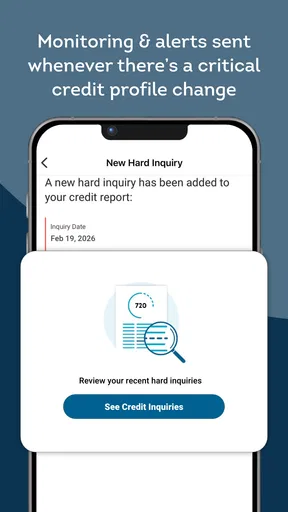
- Alerts help identify potential changes in your credit profile.
- Includes educational resources for improving credit health.
- Identity protection features can support fraud awareness.
- Clean interface makes account details easy to navigate.
Cons
- Some features require a paid TransUnion membership.
- Credit score updates may not be available in real time.
- Offers and alerts can feel promotional or repetitive.
- Coverage and features vary depending on your country.
- Personal information is required to create and verify an account.
FAQs for TransUnion®
What is TransUnion® and what can I use the app for?
TransUnion® is a personal credit and identity-management app that lets you review information connected to your credit profile from a mobile device. Depending on your location and membership, you may be able to check your credit score and report, receive monitoring alerts, review account activity, and access educational tools. Available features can vary by country, subscription, and eligibility.
Is the TransUnion® app free to download and use?
The TransUnion® app can generally be downloaded at no charge, but some of its services may require payment. Basic access, credit information, or limited monitoring features may be available for free, while frequent score updates, identity monitoring, alerts, and additional protection tools can be part of a paid plan. Always review the current pricing and trial terms before subscribing.
Does using TransUnion® affect my credit score?
Checking your own credit information through TransUnion® is typically considered a soft inquiry and should not lower your credit score. However, the app may provide links or offers for credit cards, loans, or other financial products. If you apply for one of those products, the lender could perform a hard inquiry, which may affect your score. Read the application disclosures carefully.
How secure is my personal information in the TransUnion® app?
TransUnion® handles highly sensitive information, including identity details and credit data, so account security is important. The app may use authentication, encryption, alerts, and device-security features to help protect access. You should still create a strong, unique password, enable available multi-factor authentication, keep your phone updated, and avoid signing in through public or unsecured networks.
Can I dispute incorrect information or report identity theft through TransUnion®?
TransUnion® generally provides ways to review your credit file and begin a dispute when you find inaccurate or incomplete information. The exact process may be available in the app, through the website, or by contacting customer support, depending on your region. If you suspect identity theft, act quickly, follow the provided reporting steps, and consider placing an appropriate fraud alert or credit freeze.


